Views: 0 Author: Site Editor Publish Time: 2025-08-21 Origin: Site


Always unplug your shredder before you do anything else. Many people ask, "how do i unjam a paper shredder?" Paper jams happen often and do not mean your shredder is broken. You can fix most jams at home with simple steps. Safety comes first when you wonder, "how do i unjam a paper shredder?" Stay calm and follow basic tips to clear the jam and keep your fingers safe.
Always unplug your shredder before you clear a jam. This keeps you safe from getting hurt. Empty the shredder bin to make more space. This helps stop the jam from getting worse. Use the reverse mode to loosen stuck paper gently. This will not harm the shredder. If reverse mode does not work, take off the shredder top carefully. Use tweezers or pliers to pull out the jammed paper. Lubricate the shredder blades often with shredder oil. This keeps them sharp and helps stop jams. Put in small amounts of paper at one time. Take out staples or clips before shredding to avoid jams. Clean your shredder often by removing dust and scraps. This helps it work well. Stop using the shredder if you hear loud noises. Also stop if you see smoke or the blades do not move. Get help from a professional if these things happen.

Before you start fixing a jam, you need to focus on safety. Many accidents happen when people rush or skip important steps. You can avoid injury and damage by following these simple rules.
Your first step should always be to pull out the shredder power cord. Never try to clear a jam while the shredder is plugged in. If you leave the machine connected, you risk serious injury. For example, one person tried to unjam a shredder using scissors while it was still powered on. The shredder sensed the metal and pulled the scissors in, damaging the blades and destroying the machine. This accident shows why you must pull out the shredder power cord before you do anything else. You protect your hands and the shredder by making sure there is no electricity running to the machine.
Tip: Always double-check that the shredder is unplugged before you reach inside.
A full bin can make a jam worse. When you empty the bin, you give the shredder more space to work and prevent extra paper from getting stuck. Most manufacturers recommend removing all shredded paper from the waste basket before you try to fix a jam. This step also helps you see if any paper is hanging down from the blades. If you notice a lot of buildup, take a moment to clean it out. You make the next steps easier by starting with an empty bin.
Remove the bin carefully.
Shake out all the shredded paper.
Check for any scraps stuck to the sides.
Look closely at the shredder opening and blades. Try to spot where the paper is stuck. Do not touch the blades with your fingers. Use a flashlight if you need better light. If you see paper bunched up or wrapped around the blades, note where the jam is. Sometimes, the shredder may feel hot if it has been running for a long time. Let it cool down before you continue. Overheating can damage the motor and make the jam worse.
Note: If you cannot see the jam clearly, wait for the shredder to cool and then try again. Never use sharp tools or force to remove paper unless the shredder is unplugged.
By following these steps, you lower the risk of injury and keep your shredder working longer. Always remember that safety comes first.
When you face a jam, the reverse mode on your shredder can help you clear it without taking the machine apart. Many shredders include this feature as a practical tool for fixing a basic jam. You can use it as part of your regular maintenance routine.
Most shredders have a switch or button labeled "Reverse." You should locate this control on your shredder. After unplugging and inspecting the machine, plug it back in and switch shredder to reverse. This action makes the blades spin in the opposite direction. The reverse mode helps loosen stuck paper and can move it away from the blades. If your shredder has an auto mode that does not clear the jam, try the reverse function next. Many users find this step useful for fixing a basic jam before trying more advanced methods.
Tip: If your shredder does not respond right away, give it a few seconds. Sometimes the motor needs a moment to adjust.
While the shredder runs in reverse, you can gently pull the exposed paper out. Hold the paper with both hands and use slow, steady force. Do not yank or twist the paper. If the paper moves, keep pulling until it comes free. If it does not move, stop and try another method. Forcing the paper can damage the blades or the motor. Experts warn that repeated use of reverse mode, especially when the paper is tightly stuck, can harm your shredder. Always use gentle pressure and avoid pulling too hard.
Use two hands for better control.
Stop if you feel strong resistance.
Never use sharp tools while the shredder is plugged in.
If the jam does not clear after one try, you can alternate between forward and reverse modes. Switch shredder to reverse, then back to forward, and repeat a few times. This action can help loosen stubborn paper and move it out of the blades. However, do not repeat this process too many times. Forcing the motor by switching directions can cause rubbing and wear on the internal parts. If the paper still does not come out, unplug the shredder and try manual removal. If you cannot fix the jam, consider taking the shredder to a professional service center.
Note: Using reverse mode works best for small jams. If the jam is severe, you may need to open the shredder and remove the paper by hand.
By following these steps, you can often clear a jam without taking apart your shredder. Remember to stay patient and avoid forcing the machine. This approach keeps your shredder working longer and helps you avoid costly repairs.

If the reverse mode does not clear the jam, you may need to manually unclog a shredder. This method gives you more control and helps you reach paper stuck deep inside. You should always unplug the shredder before you start. Safety must come first when you work near sharp blades.
Start by lifting the shredder head off the bin. Most shredders have a removable top. Place the shredder head on a flat, stable surface. This step lets you see the jammed paper and gives you better access. You can spot the exact area where the paper is stuck. If you see a lot of paper bunched up, you know you need to manually unclog a shredder. Take your time and do not rush this step.
Tip: Keep the shredder unplugged while you work. This prevents accidents and keeps your hands safe.
You can use tweezers to pull out jammed paper. Choose a sturdy pair of tweezers or needle-nose pliers for this job. Grip the edge of the stuck paper and pull gently. If the paper does not move, try a different spot. Do not force the paper out. Forcing can bend the blades or damage the motor. Many people find that using tweezers to pull out jammed paper works best for small, reachable pieces. If you cannot reach the paper, stop and try another method.
Hold the tweezers firmly.
Pull slowly and carefully.
Avoid twisting or yanking the paper.
Note: Never use your fingers to grab paper near the blades. Always use a tool for safety.
Sometimes, small scraps of paper get stuck between the blades. You can use tweezers to pull out jammed paper in these tight spots. Work slowly and check each blade for leftover bits. If you see tiny pieces, remove them one by one. This careful process helps when you are manually unclogging a stubborn jam. You may need to repeat this step several times. Patience is important when you manually unclog a shredder.
If you notice any plastic or metal stuck with the paper, remove it as well. These objects can cause more jams in the future. After you finish, check the blades for damage. If you see bent or broken parts, you may need professional help.
Caution: Do not pour water or use oil at this stage. Wait until the jam is clear before you lubricate the blades.
Manually unclogging a stubborn jam takes time and care. You protect your shredder and your hands by working slowly and using the right tools. If you cannot clear the jam after several tries, consider calling a technician.
When you finish clearing a jam, you should oil the shredder blades. Oiling helps your shredder work better and stops new jams from happening. Many people forget this step, but it really helps your shredder last longer.
You must use oil made for shredders. Shredder oil is special because it keeps the blades safe and the machine working well. This oil spreads evenly, does not hurt metal, and works in hot or cold places. It also does not leave anything sticky behind.
Do not use cooking oil, WD-40, baby oil, or sewing machine oil. These can break your shredder and cause more jams. Some good shredder oils are:
Fellowes POWERSHRED Shredder Lubricant
GBC Swingline Shredder Oil
MBM DestroyIt Shredder Oil
To oil your shredder, do these steps:
Unplug the shredder and make sure there is no paper inside.
Put a line of shredder oil on a plain piece of paper.
Feed the oiled paper into the shredder like normal.
Run the shredder in reverse for a few seconds to spread the oil.
Tip: Oil your shredder every time you empty the bin or after a jam. This keeps the blades sharp and helps them last longer.
Using the right oil is important, but too much oil is bad. Too much oil can build up and collect dust or paper bits. This can cause more jams and even hurt the motor. Always use a little oil and follow the directions on the bottle.
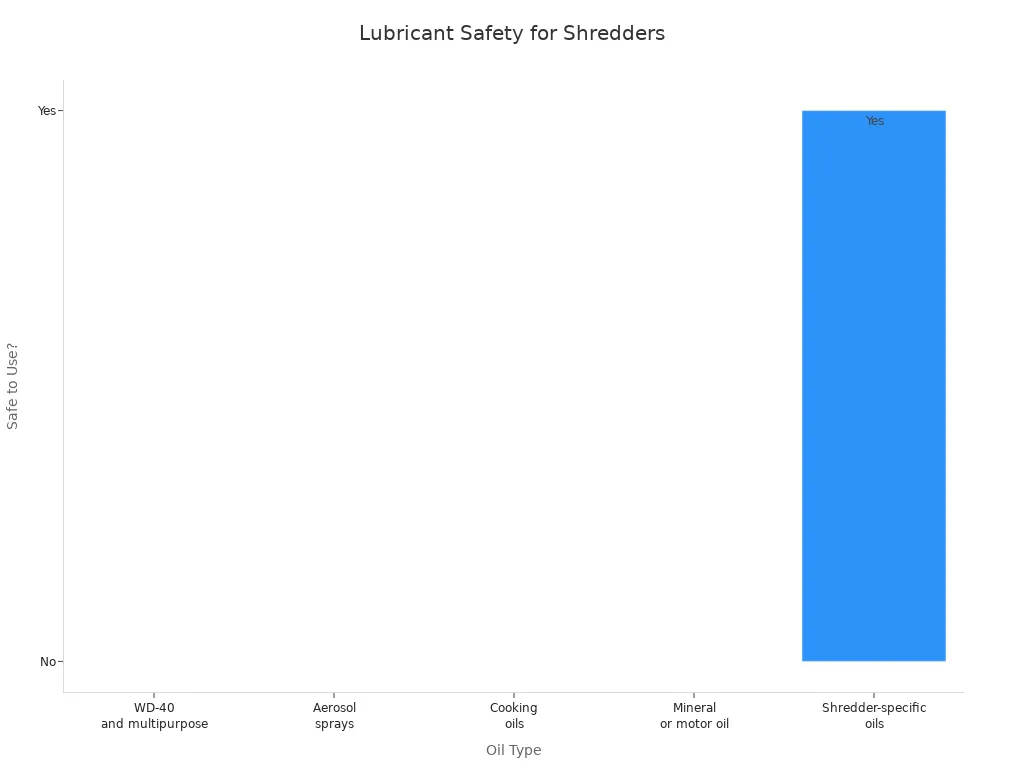
Here is a table that shows which oils are safe and which are not:
Oil Type | Safe to Use? | Reason for Avoidance or Recommendation |
|---|---|---|
WD-40 and multipurpose lubricants | No | Petroleum-based, leave residue, flammable, may cause fire risk and overspray that can short-circuit electronics |
Aerosol sprays | No | Pressurized, flammable, unsafe near electronics |
Cooking oils (olive, canola) | No | Spoil over time, clog parts, sticky residue |
Mineral or motor oil | No | Can damage rubber seals and shorten machine lifespan |
Shredder-specific oils (vegetable-based, non-aerosol) | Yes | Formulated for shredder blades, prevent buildup and jamming |
Never use WD-40 or oils like it. These oils are made from petroleum and leave sticky stuff behind. They can catch fire and might break your shredder’s electronics. Using the wrong oil can also cancel your warranty.
Note: Using shredder oil the right way helps your shredder last longer and stops jams. Always read the instructions from the manufacturer for the best results.
You need to put your shredder back together before you test it. Place the shredder head securely on the bin. Make sure the top fits snugly and does not wobble. Check that all parts are in their correct positions. If your shredder has safety locks or latches, engage them. You protect yourself and your shredder by making sure everything is secure.
Tip: Double-check that you did not leave any tools or scraps inside the bin. A clean workspace helps prevent new jams.
You can use this checklist to help you reassemble your shredder:
Place the shredder head on the bin.
Align the slots and grooves.
Secure any latches or locks.
Confirm that the power cord is not tangled.
You should always test your shredder with a single sheet of paper after reassembling. Plug the shredder back in. Feed one sheet into the slot. Watch how the paper moves through the blades. If the shredder works smoothly, you fixed the jam. If the paper stops or crumples, you may need to check for leftover scraps.
Note: Start with only one sheet. You avoid new jams and protect the motor.
Here is a simple table to help you track your test results:
Test Step | What to Look For | Action if Problem Occurs |
|---|---|---|
Insert one sheet | Smooth shredding | Proceed to next step |
Paper crumples | Possible leftover jam | Unplug and inspect again |
Shredder stops | Motor or blade issue | Seek professional help |
You can repeat the test with another sheet if the first one shreds well. Increase the number of sheets slowly. This method helps you spot problems early.
You need to listen carefully when you test your shredder. A healthy shredder makes a steady, low sound. If you hear grinding, clicking, or squeaking, you may have a problem. These noises can mean that paper is still stuck or that the blades need more oil.
Alert: Unusual sounds can signal damage. Stop using the shredder if you hear loud or strange noises.
You can use your senses to check for issues:
Listen for grinding or squeaking.
Smell for burning or overheating.
Watch for slow or uneven shredding.
If you notice any problems, unplug the shredder and inspect it again. You keep your shredder safe by acting quickly. Regular testing and listening help you catch issues before they become serious.
You finish the process by making sure your shredder works well. You protect your investment and keep your workspace safe. Remember to test your shredder after every jam and listen for signs of trouble.
You can prevent most paper jams by feeding your shredder small batches of paper. Every shredder has a maximum sheet capacity. You should check your shredder’s manual or look for a label near the feed slot. If you put in too many sheets at once, the blades can get stuck or the motor can overheat. Experts say you should never overload your shredder. Feeding fewer sheets at a time keeps the blades moving smoothly and reduces the chance of jams.
Tip: If you are not sure how many sheets your shredder can handle, start with just two or three. Increase the number slowly until you find the right amount.
Here is a quick guide to help you remember:
Shredder Type | Typical Sheet Capacity | Best Practice |
|---|---|---|
Personal/Home | 5-8 sheets | Feed 2-3 sheets |
Small Office | 10-15 sheets | Feed 5-7 sheets |
Heavy Duty | 20+ sheets | Feed 10-12 sheets |
Letting your shredder rest after heavy use also helps. If you shred a lot of paper, give the machine a break so it does not overheat.
Staples and paper clips can cause jams and damage the blades. You should always check your documents before shredding. Remove any staples, paper clips, or adhesive materials. Some shredders claim to handle staples, but removing them is still safer for your machine. Staples can get caught between the blades and stop the shredder from working.
Check each stack of paper for metal fasteners.
Use a staple remover or your fingers to pull out staples.
Look for sticky notes or tape and peel them off.
Alert: Shredding adhesive materials can leave sticky residue on the blades. This can attract dust and cause more jams later.
By taking a few seconds to remove staples and clips, you protect your shredder and keep it running longer.
Paper dust and small scraps can build up inside your shredder. Regular cleaning keeps the blades sharp and the motor strong. Experts recommend cleaning your shredder after every use or at least once a week if you use it often. Unplug the shredder before you start cleaning.
You can follow these steps:
Empty the bin and shake out loose paper.
Use a soft brush or cloth to wipe away dust from the blades and feed slot.
Check for small pieces stuck between the blades and remove them with tweezers.
Oil the blades with shredder-specific oil to reduce friction and heat.
Note: Never use water or household cleaners on your shredder. Only use products made for shredders.
Regular cleaning helps your shredder last longer and work better. You will notice fewer jams and smoother shredding if you keep your machine clean.
Lots of new paper shredders have anti-jam features. These features help stop jams and keep your shredder working well. You should learn what these tools do and how to use them.
Anti-jam technology works in a few ways. Some shredders have sensors that notice when too much paper goes in. The machine will stop and warn you before a jam happens. Other shredders can reverse the blades if they sense a blockage. This helps clear the paper. You can find out about these features in the manual or on the control panel.
Check if your shredder has any anti-jam features like these:
Jam Detection Sensors: These sensors watch the paper feed. If you put in too much paper, the shredder stops and flashes a warning light.
Auto-Reverse: This makes the blades spin backward when a jam starts. You can press a button or it may happen by itself.
Overload Indicators: Some shredders show a red light or beep if you put in too many sheets.
Manual Reset: You can press a button to reset the shredder after a jam.
Tip: Read your shredder’s manual to see which anti-jam features it has. Manuals often have pictures and easy steps to follow.
Test these features before you really need them. Try putting in a small stack of paper and watch what happens. If the shredder stops or reverses, the anti-jam system is working. Look for warning lights or listen for beeps.
Here is a simple table to help you keep track of your shredder’s anti-jam features:
Feature | How It Works | What You Should Do |
|---|---|---|
Jam Detection Sensor | Stops feed, flashes light | Remove extra paper, restart |
Auto-Reverse | Blades spin backward | Wait, then try again |
Overload Indicator | Light or sound alert | Reduce paper stack |
Manual Reset | Button to reset motor | Press to clear jam |
Follow the manufacturer’s rules for your shredder. Each shredder is a little different. Some need cleaning or oiling to keep anti-jam features working. Check the manual for tips on taking care of your shredder.
If your shredder does not have anti-jam features, you can still stop jams. Feed only a few sheets at a time, take out staples, and clean the blades often. You can also buy a shredder with better features if you shred lots of paper.
Anti-jam features make shredding safer and easier. You save time and avoid repairs. You also protect your shredder from breaking. By learning about these features, you keep your shredder working well and stop jams from happening.
Note: If anti-jam features stop working, call the manufacturer or a repair shop. Do not ignore warning lights or weird sounds.
You will have fewer problems and smoother shredding if you check and use anti-jam features. Your shredder will last longer and work better every day.
You may notice that your shredder does not work as it should. Sometimes, you can fix small problems at home. Other times, you need help from a professional. You should look for clear signs of a jammed shredder before you decide what to do next.
Here are some signs of a jammed shredder that mean you need help:
The shredder makes loud grinding or clicking noises.
The motor stops running even after you clear the paper.
You see smoke or smell something burning.
The blades do not move when you press the buttons.
The shredder jams every time you use it, even with only one sheet.
If you see any of these signs of a jammed shredder, you should stop using the machine right away. You risk damaging the motor or hurting yourself if you keep trying to fix it. Sometimes, broken parts inside the shredder cause these problems. You cannot fix these issues with simple tools at home.
Alert: If you see sparks, smoke, or melted plastic, unplug the shredder and call a repair shop. Do not try to open the shredder by yourself.
You may also notice that the shredder does not shred paper evenly. Torn or crumpled paper can mean the blades are bent or broken. If you hear strange sounds or see pieces of metal in the bin, you should get help. A technician can check the motor, blades, and sensors for damage.
You can save money and time if your shredder is still under warranty. Most shredders come with a warranty that covers repairs for a set period. You should check your receipt or the manufacturer’s website to find out how long your warranty lasts.
Here is a simple table to help you understand your options:
Warranty Type | What It Covers | What You Should Do |
|---|---|---|
Manufacturer | Parts and labor | Contact customer service |
Store/Dealer | Replacement or refund | Bring shredder to store |
Extended Warranty | Extra years of coverage | Register online or call |
If your shredder breaks during the warranty period, you should contact the manufacturer or the store where you bought it. You may need to show proof of purchase. Some companies offer free repairs or send you a new shredder. You should read the warranty terms to see what is covered. Most warranties do not cover damage from misuse, like trying to shred metal or plastic.
Tip: Keep your receipt and warranty card in a safe place. You may need them if you ask for repairs or a replacement.
If your warranty has expired, you can still call a repair shop. Some shops offer free estimates. You can ask about the cost before you decide to fix or replace your shredder.
You protect your investment by knowing when to get help and how to use your warranty. You keep your shredder working longer and avoid costly mistakes.
You may wonder how to unjam paper shredders when your machine stops working. You do not need to panic. You can fix a jammed shredder by following a few simple steps. First, always unplug the shredder before you start. This keeps you safe from sharp blades and moving parts.
You should empty the bin to give yourself more space. Look inside the feed slot and check for stuck paper. If you see a jam, try using the reverse mode. Most shredders have a button or switch for this. Press reverse and gently pull the paper out. Do not force it. If the paper does not move, stop and try another method.
Sometimes, you need to un-jam a shredder by hand. Remove the shredder top and place it on a flat surface. Use tweezers or pliers to grab small pieces of paper. Pull slowly and carefully. You should never use your fingers near the blades. If you cannot reach the paper, do not push or twist. You may damage the blades or motor.
After you clear the jam, you need to lubricate the blades. Use shredder oil and follow the instructions. Do not use WD-40 or cooking oil. Proper lubrication helps prevent future jams. Put the shredder back together and test it with one sheet of paper. Listen for grinding or squeaking sounds. If you hear anything strange, unplug the shredder and check again.
Here is a quick checklist to help you remember how to un-jam a shredder:
Unplug the shredder.
Empty the bin.
Inspect for jams.
Use reverse mode.
Gently pull out paper.
Remove shredder top if needed.
Use tweezers or pliers.
Lubricate blades.
Reassemble and test.
Tip: Always read your shredder’s manual before you try to unjam a paper shredder. Each model may have special instructions.
You can prevent jams by feeding small batches of paper, removing staples, and cleaning your shredder often. If you see signs of damage, contact a professional. You keep your shredder working longer when you follow these steps.
The next time you ask yourself, "how do i unjam a paper shredder," remember these safety tips and steps. You can unjam a paper shredder at home and avoid costly repairs. Learning how to un-jam a shredder helps you save time and protect your machine. You now know how to fix a jammed shredder and keep your workspace safe.
You can fix most jams in a paper shredder by doing these things: First, unplug the shredder so it is safe. Next, try reverse mode or take out the jammed paper by hand. Then, put shredder oil on the blades to help them work better. After that, test the shredder with just one sheet of paper.
Safety is very important. Go slow and use the right tools.
Cleaning your shredder often and shredding only a few sheets at a time helps stop jams from happening again. If your shredder keeps getting stuck or makes weird sounds, you should ask a professional for help. They can fix the blades, motor, or sensors. You can also look up guides, watch videos, or read tips online to learn more. For extra information, check out Paper Shredder or find troubleshooting guides about shredder care.
You should oil your shredder every time you empty the bin or after heavy use. Regular oiling keeps the blades sharp and helps prevent jams. Always use shredder-specific oil for best results.
No, you should never use WD-40 or cooking oil. These products can damage the blades, attract dust, and may void your warranty. Always choose oil made for shredders.
Turn off and unplug the shredder. Let it cool for at least 30 minutes. Overheating can damage the motor. You can prevent this by shredding small batches and giving the machine breaks.
You may be feeding too many sheets at once or shredding items like staples or thick paper. Clean the blades often and check for leftover scraps. Always follow the manufacturer's guidelines.
Some shredders can handle credit cards or CDs. Check your shredder’s manual first. If your shredder is not rated for these items, do not try. You could break the blades or jam the machine.
You can use tweezers or needle-nose pliers. These tools help you grab small pieces without touching the blades. Never use your fingers near the blades. Always unplug the shredder before you start.
If you hear loud grinding, see smoke, or the blades do not move, stop using the shredder. Contact a repair shop or the manufacturer for help. Do not try to fix electrical or motor problems yourself.
No, you should unplug your shredder when not in use. This prevents accidental starts and keeps you safe during cleaning or maintenance.


