Views: 0 Author: Site Editor Publish Time: 2026-01-12 Origin: Site


You need to know how to find the right paper shredder for your business. Your data and information must stay safe. Every industry has strict rules to follow. Hospitals, banks, and law offices all have to destroy data. They do this because of different laws. For example, HIPAA makes healthcare keep patient records for years. Finance firms must follow SEC and IRS rules. Your office needs a shredder that fits your data amount. It should also match how private your documents are. You also need to think about your budget. The right shredder helps you save money. It helps you follow the law. It keeps your information safe. Think about these things before you choose how to find the right paper shredder for your business.
Figure out what you need to shred by looking at the types of papers you have, like money, law, or private papers. Pick a shredder that matches how much and how often you shred. Think about how many people will use the shredder. Pick the right security level for your shredder. You need higher security for important papers, especially in jobs with rules. Learn about shredder types: strip-cut is for simple jobs, cross-cut is safer, and micro-cut gives the most safety. Think about how many sheets it can shred and how fast it works. A shredder that shreds more and faster helps busy offices. Choose a shredder that can handle more work as your business grows. Make a plan to take care of your shredder so it works well. Clean and oil it often to stop jams and make it last longer. Make sure shredded papers are thrown away safely. Use locked bins and work with trusted companies to keep private papers safe.
Picking a paper shredder starts with knowing what you need. This guide helps you make good choices. It keeps your data safe. It saves you money. It helps your office work well.
You need to know what papers you must destroy. Every business has different paperwork. Some papers are riskier than others. Here are common types you may need to shred:
Financial documents: invoices, tax records, banking documents, payroll records
Client and employee information: employee files, customer account information, contracts, medical records, training records
Legal documents: outdated business licenses, settlement agreements, non-disclosure agreements, regulatory documents
Marketing and operational materials: drafts of marketing campaigns, outdated policies, old business proposals
If you have very private papers, get a shredder with more security. Keeping things private and following rules is important.
Now, think about how much and how often you shred. Your shredder should fit your daily work. Ask yourself these questions:
Do you shred papers every day or just sometimes?
Does your business shred often, or only during big cleanouts?
How many people will use the shredder?
Tip: If you have lots of papers, you may shred often. If you have big cleanouts, you may shred less. Many offices shred monthly, quarterly, or yearly. It depends on how much paper you have.
Pick a shredder with the right security level. DIN 66399 shows these levels. It tells you how small the shredder cuts paper. Use this table to compare:
Security Level | Description |
|---|---|
P-1 | strips: ≤ 12 mm (½”) wide |
P-2 | strips: ≤ 6 mm (¼”) wide |
P-3 | strips: ≤ 2 mm wide |
P-4 | cross-cut: ≤ 160 mm² particles, width ≤ 6 mm |
P-5 | cross-cut: ≤ 30 mm² particles, width ≤ 2 mm |
P-6 | cross-cut: ≤ 10 mm² particles, width ≤ 1 mm |
P-7 | cross-cut: ≤ 5 mm² particles, width ≤ 1 mm |
A higher number means smaller pieces and more security. Pick a level that matches your needs. If you work in healthcare or finance, you must follow strict rules.
Some jobs need the highest security for shredders. Here are some examples:
Industry Type | Reason for High Security Level |
|---|---|
Government Agencies | Handle sensitive governmental data and must comply with regulations. |
Hospitals | Manage patient records and sensitive health information. |
Doctor’s Offices | Protect confidential patient information and comply with HIPAA. |
IT Companies | Deal with sensitive client data and proprietary information. |
If your business is like these, buy a shredder with top security. It keeps your data safe. It helps you follow the rules. It helps your clients trust you.
Remember: The best guide says to match your shredder’s security level to your job’s needs. If you want shredder ideas, look for ones that meet your rules.
You need to know about different paper shredders. Each cut style helps your business in its own way. You want to keep your information safe. You also want your work to go smoothly. Here are the main shredder choices you can find.
Strip-cut shredders are the simplest kind. They cut paper into long strips. These are good for papers that are not private. Strip-cut shredders work quickly. They cost less than other shredders. Many small offices use strip-cut shredders for easy jobs.
Tip: Use a strip-cut shredder for junk mail or old notes.
Strip-cut shredders do not give much security. Someone could put the strips back together. Do not use them for private or secret papers. Strip-cut shredders are best for small offices with low security needs.
Cross-cut shredders keep your papers safer. They cut paper up and down and across. This makes small pieces. It is hard for anyone to put the papers back together. Use cross-cut shredders for secret papers like client records.
Many offices pick cross-cut shredders. They are fast, safe, and not too expensive. You can shred more papers without slowing down your team. Cross-cut shredders are good for businesses that want better safety but do not need the most expensive machines.
Here is a table to compare shredder types:
Feature | Strip-Cut Shredders | Cross-Cut Shredders | Micro-Cut Shredders |
|---|---|---|---|
Shred Type | Makes strips | Makes small pieces | Makes tiny bits |
Security Level | P-1 to P-2 | P-3 to P-4 | P-5 to P-7 |
Typical Applications | Regular papers | Secret papers | Very secret papers |
Micro-cut shredders give you the most safety. They turn each paper into thousands of tiny bits. Pick a micro-cut shredder if you have very secret papers. Hospitals and law offices use these shredders.
Micro-cut shredders follow strict rules. They keep your data safe from thieves. Micro-cut shredders are used in places where safety is very important.
See how cut style changes safety:
Cut Style | Security Type | Security Level | Shreds Per Page |
|---|---|---|---|
Strip-Cut | Basic | P-2 | 40 |
Cross-Cut | Secure | P-3 | 200 |
Super Cross-Cut | Confidential | P-4 | 400 |
Micro-Cut | High | P-5 | 2,000 |
High Security | Top Secret | P-7 | 15,600 |
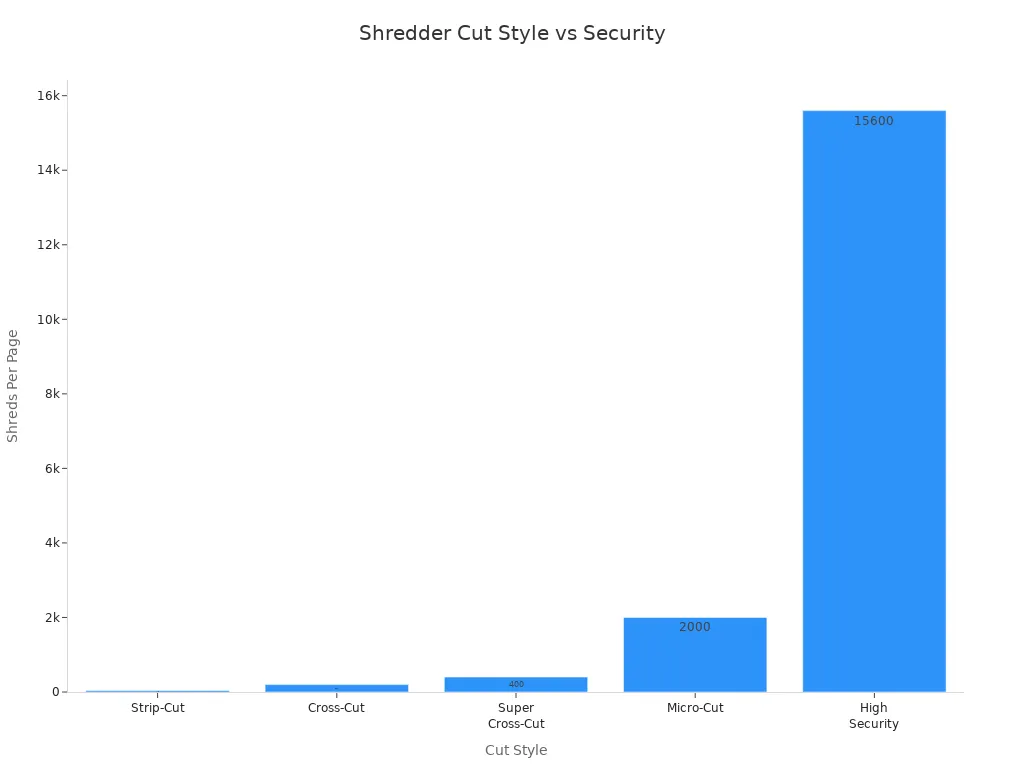
If you want the best safety for your business papers, get a micro-cut shredder. You will keep your business safe and follow all privacy rules.
You want to protect more than just paper. Specialty shredders give you the power to destroy many types of sensitive materials. These machines help you meet strict rules and keep your business safe. You can choose from different specialty shredders for your unique needs.
You handle more than paper every day. You use CDs, DVDs, credit cards, and even old floppy disks. These items can hold private data. You cannot throw them in the trash. You need a shredder that destroys them for good.
Multi-media shredders break down:
CDs and DVDs
Credit cards and ID badges
Floppy disks and tapes
Flash drives and SSDs
Mobile phones and X-rays
You find these shredders in finance, healthcare, legal, and government offices. They help you follow data protection laws. You can trust a multi-media shredder to keep your information safe. You do not want old data to fall into the wrong hands. You want to show your clients you care about their privacy.
Tip: Choose a multi-media shredder if you store client data on electronic media. You will meet compliance rules and avoid costly mistakes.
You run a busy office or a large company. You need a shredder that works hard all day. Industrial shredders handle huge amounts of material. They do not slow down. They do not jam easily. You can shred stacks of paper, binders, and even cardboard.
Industrial shredders work in:
Large commercial offices
Warehouses
Print shops
Hospitals and banks
Government buildings
You can use an industrial shredder for more than paper. These machines destroy CDs, credit cards, and even hard drives. You get peace of mind. You know your data is gone for good.
Here is a quick look at what industrial shredders can do:
Feature | Benefit |
|---|---|
High sheet capacity | Shred hundreds of pages fast |
Large bin size | Fewer emptying trips |
Heavy-duty motors | Run for hours without stopping |
Multi-material shredding | Destroy paper and media |
You want to save time and money. You want a shredder that keeps up with your workflow. Industrial shredders give you that power. You can trust them for your commercial needs. You can handle big jobs without worry.
Note: If you have a high-volume office, an industrial shredder is your best choice. You will boost security and keep your business running smoothly.
You see the difference. Multi-media shredders protect your digital data. Industrial shredders handle large jobs and many materials. You can pick the right specialty shredder for your commercial or industrial needs. You will protect your business and your clients.

You want a shredder that keeps up with your office. Sheet capacity tells you how many sheets you can shred at once. If you pick a shredder with higher sheet capacity, you save time. You can shred more documents in one pass. This means you spend less time standing by the machine. Your team works faster and stays focused on important tasks.
Higher sheet capacities let you shred more documents in a single pass.
You boost productivity and reduce downtime.
Streamlined workflows help your business, especially if you handle large amounts of sensitive paperwork.
Think about your daily volume. If you shred a lot every day, choose a shredder with a high shredding capacity. For small offices, a lower sheet capacity may work. For busy teams, a higher number makes a big difference.
Tip: Match your shredder’s sheet capacity to your team’s workload. You will see better results and fewer interruptions.
Bin size matters more than you think. A small bin fills up fast. You waste time emptying it. A large bin lets you shred longer without stopping. The right bin size depends on your office size and how much you shred.
Here is a quick guide to help you choose:
Office Size | Bin Size (Gallons) | Description |
|---|---|---|
Small | 9 | Compact and secure, ideal for individual users with light shredding needs. |
Medium | 21 | Suitable for shared cubicle areas or small departments, offering moderate capacity. |
Large | 32 | Designed for larger workgroups or high-traffic areas, providing increased capacity. |
Large | 64 | Best for large offices or centralized shredding stations, with a durable build and rolling wheels. |

If you run a large office, pick a shredder with a big bin. You will spend less time emptying and more time working. For a small office, a compact bin saves space and keeps things tidy.
Shredding speed shows how fast your shredder works. You want a machine that keeps up with your pace. Some commercial shredders can shred at amazing speeds. For example, the Intimus 16.86 shreds at 78.7 feet per second. Another model can shred up to 700 sheets of A4 paper at 3 meters per minute.
Fast shredders help you finish big jobs quickly.
You avoid long lines at the shredder.
Your team stays productive, even during busy times.
Choose a shredder with the right speed for your needs. If you handle high volumes, a faster machine saves you time and money. For lighter workloads, a moderate speed works well.
Remember: The right capacity and speed help your business run smoothly. You protect your data and keep your team efficient.
You want a shredder that works as hard as you do. The duty cycle tells you how long your shredder can run before it needs a break. This feature matters when you have a lot of documents to destroy. If you ignore the duty cycle, you risk overheating your machine and slowing down your workflow.
Think about your office. Do you shred a few papers each day, or do you handle stacks of files at once? If you run a busy office, you need a shredder with a strong duty cycle. This means the machine can run for a longer time without stopping. You keep your team moving and avoid long waits at the shredder.
The duty cycle works together with capacity. A shredder with a high sheet capacity can handle more paper at once, but if the duty cycle is short, you still have to stop and wait. You want both features to match your needs. For example, a shredder with a 30-minute duty cycle can run for half an hour before it needs to cool down. Some heavy-duty models can run non-stop for hours. These are perfect for high-volume environments.
Tip: Always check the duty cycle before you buy. You do not want your shredder to overheat during a big job.
Here is a quick guide to help you choose:
Duty Cycle | Best For | Example Use Case |
|---|---|---|
2-5 minutes | Home or small office | Shredding a few pages a day |
10-30 minutes | Medium-sized business | Daily shredding by several users |
Continuous (60+ min) | Large office or high-volume | Bulk shredding, frequent use |
In high-volume environments, the duty cycle becomes even more important. You need a shredder that can keep up with your workload. A longer duty cycle means less downtime and more productivity. You save time and keep your business running smoothly.
When you look for the best shredder, always match the duty cycle to your office’s shredding habits. Combine this with the right capacity and you will never have to worry about delays or machine breakdowns. Your team will thank you for choosing a shredder that fits your needs.
You want a quiet workspace. Loud shredders distract your team and slow down work. When you pick a shredder for your needs, check the noise level. Many modern shredders run quietly, so you can keep your office peaceful. Look for models that list decibel ratings. Lower numbers mean less noise.
Here is a quick guide to help you choose the right noise level:
Environment | Recommended Decibel Level |
|---|---|
Open offices | ≤ 60 dB |
Home offices | ≤ 55 dB |
Clinics/Law offices | ≤ 58 dB |
If you work in a shared space, a quiet shredder for your needs will keep everyone happy. You will boost productivity and create a better work environment.
You want to keep your team safe. Shredders have sharp blades and strong motors. The right safety features protect everyone in your office. When you choose a shredder for your needs, look for these important features:
Safety Feature | Description |
|---|---|
Thermal safety lock | Shuts down the shredder if it gets too hot. |
Auto start | Runs only when you feed paper, so no one gets hurt by accident. |
Automatic feed | Lets you shred stacks of paper without standing by the machine. |
Auto stop | Stops the shredder if it senses something that should not be there. |
Anti-jam / auto reverse | Reverses the blades if paper gets stuck, so you do not have to reach inside. |
Bin capacity sensor | Alerts you before the bin gets too full, preventing jams and accidents. |
Auto shut-off keeps your office safe. If the shredder gets too hot or senses a problem, it turns off by itself. You do not have to worry about fires or damage. This feature is a must-have for busy offices.
Safety locks stop the shredder from running when you do not want it to. You can lock the machine during cleaning or maintenance. This feature protects children and staff from accidents. Always choose a shredder for your needs with strong safety locks.
You want your shredder to last. Good maintenance features make your job easier and keep your machine running smoothly. Here are the top maintenance tips for every office:
Keep your shredder lubricated. Oil the blades to prevent overheating.
Clean your shredder often. Remove dust and paper bits to avoid jams.
Watch the paper capacity. Do not overload your shredder.
Empty the bin before it gets full.
Use your shredder the right way. Do not shred things that can break the blades.
Give your shredder time to cool down after heavy use.
Jam prevention features save you time and stress. Look for shredders with auto-reverse or anti-jam technology. These features stop jams before they start. You will spend less time fixing problems and more time working.
Easy cleaning keeps your shredder in top shape. Choose models with removable bins and clear access to the blades. Regular cleaning prevents dust buildup and keeps your shredder for your needs working like new.
Tip: The best shredder for your needs will have quiet operation, strong safety features, and easy maintenance. You will protect your team, save money, and keep your office running smoothly.
You want your business to run smoothly. You need tools that save time and money. Advanced features in modern shredders help you reach these goals. They make shredding easier, faster, and more efficient. Let’s look at two advanced options that can transform your office.
Auto feed changes the way you shred documents. You do not have to stand by the shredder and feed each page by hand. You can load a stack of papers, press a button, and walk away. The shredder does the work for you.
You save time because you do not need to feed paper one sheet at a time.
You can handle large shredding jobs with less effort.
Your team can focus on important work instead of waiting by the shredder.
Auto-feed shredders boost your office’s productivity. They let you process more documents in less time. You will notice smoother workflows and happier employees. If you want to improve efficiency, auto feed is a must-have among advanced features.
Tip: Choose auto feed if you have high-volume shredding needs or want to free up your staff for other tasks.
You care about your business costs. You also want to help the environment. Energy saving options in shredders help you do both. These features cut down on wasted power and lower your bills.
Auto-off technology powers down the shredder when it is not in use.
You avoid wasting energy during long idle periods.
Intelligent thermal management keeps the shredder cool and prevents unnecessary restarts.
Studies show that most of a shredder’s energy use comes from running when it is not shredding. Energy saving features stop this waste. You get a machine that works only when you need it. You protect your budget and the planet at the same time.
Here is a quick comparison of energy saving benefits:
Feature | Benefit |
|---|---|
Auto-off | Cuts power during inactivity |
Thermal management | Reduces energy waste and overheating |
Lower standby power | Saves money on electricity |
You want advanced features that make your business better. Auto feed and energy saving options give you more control, more savings, and more time. Make your next shredder work smarter for you.
You want to spend your money wisely on a paper shredder. Business shredders come in many prices. Some are cheap for small offices. Others cost more for big jobs. Here is what you might pay:
Price Range |
|---|
$56.81 - $205.52 |
Cheaper shredders do simple jobs and protect basic data. If you shred secret papers every day, pick a better shredder. Expensive shredders have more features and last longer. They keep your business and data safe.
Tip: Think about how much you shred and what kind of papers you have. Spending more now can stop big problems later.
You need to think about more than just buying the shredder. Every shredder has extra costs. You pay for labor, fixing, and keeping it working. Most people spend about $97.58 each month to use a shredder. This includes:
Labor costs are about $87.71 each month. Workers spend 15 minutes a day shredding.
Maintenance costs, like sharpening blades and fixing small issues.
The average worker earns $16.19 per hour.
If you want to save money, pick a shredder that is fast and does not jam. You will save time and keep your data safe.
Note: A good shredder lets your team work on important things, not just shredding.
You want a shredder that works for many years. How long it lasts depends on the brand and features. Some brands use special parts to make shredders stronger. Here is a table to compare:
Brand | Durability Features | Warranty Information |
|---|---|---|
Fellowes | 100% Jam Proof Technology, Auto Reverse | N/A |
Dahle | Precision milled cutting cylinders for trouble-free use | N/A |
HSM | Hardened steel cutting rollers, Lifetime warranty on some | Lifetime warranty on cutting rollers |
Kobra | Carbon-hardened cutting knives for long-lasting edge | N/A |
Intimus | SolidCut technology for strong and precise cutting | N/A |
A strong shredder keeps your data safe year after year. You do not have to fix or replace it often. When you buy a trusted brand, you get peace of mind and good value.
Pick a shredder with strong parts. You will keep your data safe and your business running well.
Buying a paper shredder should make you feel safe. A good warranty helps you save money and worry less. If your shredder breaks, you want help fast. You do not want to pay for repairs yourself. Pick a shredder with a strong warranty. The company should stand by its product.
Top brands give different warranties. Some cover the whole shredder. Others protect the cutting rollers for life. Always check what the warranty covers before you buy. Here is what some brands offer:
Machine Type | Warranty Period | Coverage Details |
|---|---|---|
HSM Shredstar | 2 years / 1 replacement | Covers defects in manufacturing and assembly |
HSM SECURIO C, B & P-Series | 5 years | Limited Lifetime coverage for cutting rollers |
HSM SECURIO Auto Feeds | 3 years | Limited Lifetime coverage for cutting rollers |
BCA Industries Shredders | 1 year | Covers defects in manufacturing, materials, assembly |
Kobra Shredders | 1 year | Covers manufacturing defects and repair labor |
Longer warranties give you more protection. If you use your shredder every day, pick one with a five-year or lifetime warranty. You will feel sure your shredder will last. Look for brands with friendly customer support. Good support helps you fix problems fast. Your office keeps working without long delays.
Some things are not covered by warranties. Most brands do not cover:
Damage from misuse or abuse
Repairs not approved by the company
Not taking care of your shredder
Always follow the care instructions from the manufacturer. Regular cleaning and oiling keep your warranty safe. Your shredder will work better and last longer.
When you shop for shredders, do not just look at price or features. Think about how strong the warranty and support are. You will protect your money and your business. You will not get surprise bills. You will get help when you need it. Pick a shredder with a warranty that fits your needs. You will feel ready for anything.
Tip: Register your shredder after you buy it. This makes it easier to get help and use your warranty.
A good warranty and support show the company trusts its product. You deserve to feel confident. Make warranty and support important when you choose your shredder.
You want to make the right choice for your office. Start by comparing the top models on the market. This step is key when you ask how to find the right paper shredder for your business. You need a shredder that matches your commercial needs, offers strong security, and fits your budget. Here are some of the highest-rated options for business use:
Aurora AU120MA 120-Sheet: This model stands out for its powerful motor, fast shredding, and quiet operation. It works well in busy commercial settings.
Amazon Basics 8 Sheet Micro Cut: You get high security at a low price. This shredder is perfect for small offices that need to protect sensitive data.
Amazon Basics 24-Sheet Cross-Cut: This machine shreds more than it promises. It handles large stacks, making it a smart pick for commercial teams.
Bonsen 12-Sheet Micro Cut: You can count on this model for solid performance. It often shreds more than its listed capacity.
Fellowes Powershred 99Ci: This is the fastest option, shredding up to 185 pages per minute. It is built for commercial environments with high security needs.
When you compare these models, look at their sheet capacity, bin size, and security level. You want a shredder that keeps up with your workflow and protects your business information.
You should always read reviews before you buy. Real user feedback helps you see how each shredder works in a commercial setting. Reviews show you if a model jams often, runs quietly, or meets tough security standards. You can spot problems before you spend your money. Look for reviews from businesses like yours. If you run a law office, find reviews from other legal teams. If you manage a medical clinic, check what other clinics say. This step helps you answer how to find the right paper shredder for your business with confidence.
Tip: Pay attention to comments about durability, ease of use, and customer support. These details matter for long-term value.
You want to make sure your new shredder fits your daily routine. If you can, test the shredder before you buy. Many office supply stores let you try models on the spot. Bring a stack of documents and see how the shredder handles them. Check the speed, noise level, and security features. Make sure the bin size works for your commercial space. Testing helps you avoid surprises and ensures you pick the best shredder for your needs.
If you cannot test in person, ask for a demo video or a trial period. This step gives you peace of mind. You know your shredder will meet your security and commercial demands. You will feel sure about how to find the right paper shredder for your business.
Remember: The right shredder protects your data, saves you time, and supports your business growth. Take these steps to make a smart investment.
You want your business to grow. Your shredding needs will change as your team gets bigger and your workload increases. If you only think about today, you might pick a shredder that cannot keep up tomorrow. You need to plan for growth so you do not waste money or slow down your workflow.
Start by asking yourself these questions:
Will your team add more people in the next year?
Do you expect to handle more paperwork or digital media?
Will new laws or rules require higher security for your documents?
Are you planning to open new locations or departments?
If you answer yes to any of these, you need a shredder that can grow with you. The best shredder for your business is not just for now. It should support your future needs.
Tip: Always buy a shredder that handles at least 25% more than your current volume. This gives you room to grow without buying a new machine soon.
Here is a table to help you match your growth plans with shredder features:
Growth Factor | What to Look For in a Shredder |
|---|---|
More employees | Higher sheet capacity, larger bin size |
More paperwork | Faster shredding speed, longer duty cycle |
New compliance rules | Higher security level (P-4, P-5, or above) |
More locations | Portable design or multiple units |
You should also think about advanced features. Auto-feed and energy-saving modes help you handle bigger jobs with less effort. If you plan to store more data on CDs or drives, pick a shredder that destroys media, not just paper.
Note: When you know how to find the right paper shredder for your business, you protect your investment. You avoid costly upgrades and keep your team productive.
Do not wait until your shredder slows you down. Plan for growth now. Choose a model that fits your business today and tomorrow. You will save money, boost security, and stay ahead of your competition.
The best shredder is the one that grows with you. Make your choice with the future in mind. Your business deserves it.
You want your shredder in the right spot. Good placement helps your team use it every day. Put your shredder where people work with sensitive documents. Place it near printers, copiers, or filing cabinets. You make destruction easy and fast. If you hide your shredder in a back room, people forget to use it. You risk losing security and letting private papers pile up.
Choose a spot with enough space. Your team needs room to feed documents and empty the bin. Keep the area clean and free from clutter. You boost destruction and keep your office safe. If you run a large office, set up shredders in more than one place. You make destruction part of your daily workflow.
Tip: Place a sign near your shredder. Remind your team about the importance of security and proper destruction.
You want your team to use the shredder the right way. Training helps everyone understand destruction rules and security needs. Show your staff how to use the shredder safely. Teach them which documents need destruction. Explain why security matters for your business.
Hold short training sessions. Use real examples from your office. Show what happens if someone skips destruction. You protect your business and build trust with clients. Make a simple checklist for your team:
Check document type before shredding
Use the right cut style for security
Never overload the shredder
Empty the bin when full
Report any problems right away
You make destruction a habit. Your team keeps your business safe. You avoid mistakes and keep up with security rules.
You want your shredder to last. Regular maintenance keeps destruction smooth and prevents breakdowns. Set a schedule for cleaning and oiling the blades. Check the bin and empty it before it gets too full. Inspect the shredder for jams or strange noises. You stop problems before they grow.
Create a simple table for your maintenance plan:
Task | How Often | Who Does It |
|---|---|---|
Clean blades | Weekly | Office manager |
Oil shredder | Monthly | Trained staff |
Empty bin | Daily | All users |
Check for jams | Weekly | IT staff |
Test security | Monthly | Supervisor |
You keep destruction reliable. Your team trusts the shredder. You meet security standards and avoid costly repairs. If you follow a schedule, your shredder works better and lasts longer.
Note: Good maintenance supports destruction and security. You save money and protect your business.
Shredding your documents is not enough. You need to make sure the shredded pieces leave your business safely. Secure disposal stops data leaks, identity theft, and legal problems. If you want to feel safe, you need a plan for after shredding.
Why Secure Disposal Matters
Shredded paper can still show information if not handled right.
Thieves might try to put strips back together from your trash.
Laws like HIPAA and FACTA say you must destroy sensitive data fully.
Tip: Do not put shredded paper in an open dumpster. Always treat it as confidential waste.
Steps for Secure Disposal
Use Locked Bins: Put shredded material in locked bins until pickup. This stops people from getting to your data.
Partner with a Certified Vendor: Pick a disposal company with NAID AAA Certification or similar. These companies follow strict rules and give proof of destruction.
Request Certificates of Destruction: Always ask for a certificate after each pickup. This paper shows you followed the law and kept your clients safe.
Separate High-Risk Waste: Keep shredded material from very sensitive documents away from regular waste. Use color-coded bags or bins to sort easily.
Limit Access: Only let trusted staff handle shredded waste. Train your team to know the risks of careless disposal.
Comparison Table: In-House vs. Outsourced Disposal
Method | Pros | Cons |
|---|---|---|
In-House Disposal | Full control, quick action | More work, higher chance of mistakes |
Outsourced Disposal | Professional help, legal proof | Costs more, less direct control |
Best Practices for Secure Disposal
Set up regular pickups to stop overflow and lower risk.
Watch disposal areas with cameras or regular checks.
Keep a record of all disposal activities for audits.
Recycle shredded paper only through secure channels.
Note: Secure disposal is more than just following rules. You build trust with your clients and protect your reputation.
You must take secure disposal seriously. When you follow these steps, you finish the job of keeping documents safe. You show your clients and partners that you care about their privacy. Make secure disposal a must in your shredding process.
You want to protect your business and save money. Start by matching your shredder’s security, speed, and features to your needs. Review your shredding habits and document types. Ask experts or vendors for advice if you feel unsure.
Tip: Check your current shredding process today. Make a smart choice and invest in a shredder that keeps your data safe and your workflow strong.
Pick a security level that matches how private your papers are. For normal office papers, P-3 is good. If you have secret or legal papers, use P-4 or higher. The right level keeps your business safe and helps you follow the rules.
Clean and oil your shredder once a month. If you shred a lot, empty the bin every day. Taking care of your shredder stops jams and helps it last longer. A shredder that works well saves you money and worry.
Most shredders for offices can shred staples and paper clips. Many can also shred credit cards. Always check your shredder’s manual before you try. Using the right shredder keeps you safe and stops damage.
Cross-cut shredders cut paper into small pieces. Micro-cut shredders make tiny bits, like confetti. Micro-cut gives you more safety. If you have very private data, pick micro-cut for the best protection.
Only put in as many sheets as your shredder can handle. Take out paper clips or thick things if your shredder cannot shred them. Use the reverse button if a jam happens. Cleaning and oiling your shredder also helps stop jams.
Think about auto-feed if you shred big stacks a lot. Auto-feed saves you time and helps you get more done. You can load your papers, press start, and walk away. Your team can do other work while the shredder runs.
Put shredded paper in locked bins. Use a trusted company to pick it up. Always ask for a certificate that shows your papers were destroyed. Safe disposal keeps your business safe from leaks and legal problems.
Look for a shredder that can shred lots of sheets at once. Pick one with a big bin, fast speed, and good safety features. Extra options like auto-feed and energy-saving help your team work better and safer. Choose what fits your office needs.


